Software Architecture
November 24, 2026
7 min read


Everyone is talking about context engineering for software development. How do you give an agent the right information, at the right time, in the right amount? Teams write CLAUDE.md and AGENTS.md files, build retrieval pipelines, tune prompts, and run ten agents in parallel.
At Software Leader, context engineering for software development means models and documentation that describe how the system behaves. Our industry has never been good at describing the behaviour of its systems, let alone modelling it.
For years that worked well enough. The knowledge lived in people's heads. When someone needed to understand the system, they asked a colleague or read the code. But the code only shows what the software does, not what the system is supposed to do. Agile gave teams a good reason to write less: working software over comprehensive documentation. Models became whiteboard photos, and the documentation became a pile of stories and pages that nobody really trusted.
Agents don't have a colleague to ask. They can read the code, but the code can't tell them the intent, so they only have what we give them. Teams that start working with many agents learn to write decent prompts quickly enough. Then they find the harder question is how to keep the description of the system true.
Ask a team a simple question: what does the version running in production do today? Last quarter's refinement plan doesn't count.
In most organisations nobody can answer that from the documentation. They answer from memory, or they open the code. The documentation is there, often lots of it, but it has no notion of now.
That was already a problem for people. For an agent it's worse, because an agent can't tell the difference.
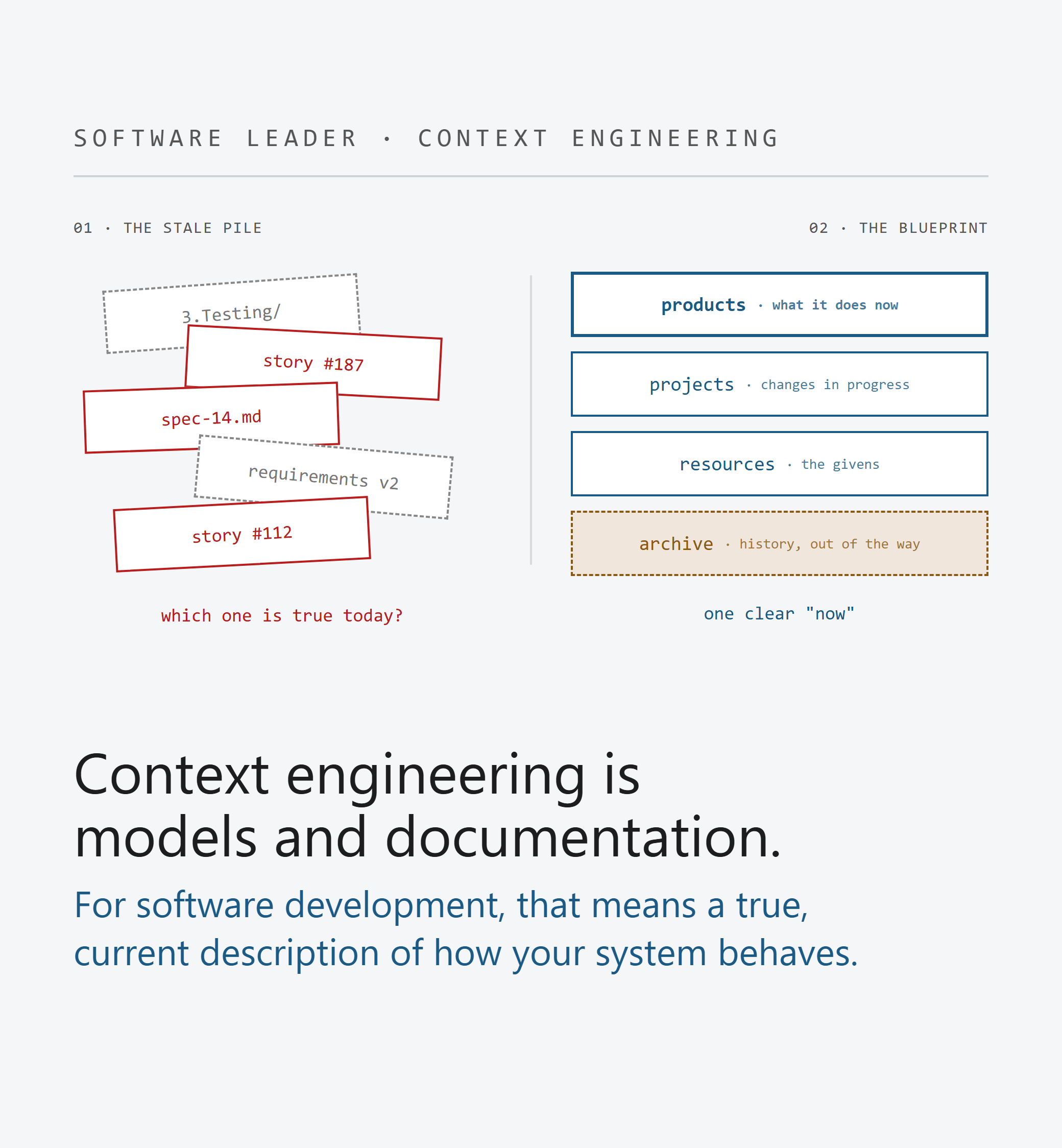
User stories compound. Teams write a story, then a story that changes that story, then another one that partly reverts it. The old stories are never deleted, because the backlog and the story board exist for planning, not for documentation. Epics and features on top add a layer, but not a result. Nobody compiles the stories into a description of how the system behaves now.
Spec files will fall into the same trap. Spec-driven development is the new hope, especially with AI agents. But there's no shared definition of what a spec file is. Is it one small behaviour or a large feature? How far do you detail it? Without that, specs pile up the way stories did: spec 14 refines spec 9, which contradicts spec 3. The agent instruction files go the same way. They grow, and after a while the agent starts ignoring parts of them.
Phase-based structures leak history. Some projects organise documentation by phase: requirements, development, testing. It looks tidy, but every release adds documents to the same sections, so old requirements for features that have since changed sit right next to the current ones.
All three fail for the same reason: the documentation is organised by when it was written (a sprint, a phase, a release) instead of by what it describes. Neither a human nor an agent can tell which document is still true and which is history.
A person might notice that a document looks old. An agent won't. It treats a requirement that was rejected in week two exactly like the final decision, and it builds on whichever one it finds first.


Building architects dealt with this a long time ago.
When you want to remodel your house, the architect starts from the blueprint of the current house. The first thing they do is check that the blueprint is still valid, because owners change things without updating the drawings. Only once the blueprint is confirmed do they model the change on top of it.
The result is a new blueprint: version 2, version 3, version 27. That is what the contractor builds from.
The contractor only gets the blueprint. The structural calculations, the months of back-and-forth with the owners and the emails about the kitchen tiles stay with the architect. A blueprint can carry some reasoning, but only the final reasoning behind it, not the whole debate.
In the systems we design, there is always a current version of the documentation that says what the system does. Sometimes several versions are active at the same time, for example in different markets. Then the documentation makes each of them explicit.
One version of the documentation maps to one version of the codebase. The blueprint comes first and the code follows from it.
Changes don't happen in that documentation directly. A new feature is a project. It takes days or weeks to design and build, and along the way it produces a lot of material: analyses, meeting notes, decisions. That material is valuable, but it is not the blueprint.
So it lives with the project. Only at the end, when the change goes to production, are the affected processes and interactions updated in the main documentation. Push to production, and you push a new version of the documentation.
You can do this with any tool: folders in a repository, spaces in Confluence, a wiki, Azure DevOps, or a full semantic model. What matters is that the documentation keeps three things apart:
We use the same structure as our context strategy. An agent working on a change reads the product blueprint and its own project, and that's it. Old projects sit in the archive, out of the way, so they don't end up in the context.
The archive is also what makes teams comfortable letting go. If you want to know why a decision was made, which alternatives were considered or how many meetings it took, it's all still there. You just don't need it to understand what the system does now, and neither does your agent.
The most precise form of documentation is a model. For systems we design with a semantic model, the same principle applies: one semantic model per released version, as part of the blueprint, not all of it.
Where it helps most is impact analysis. Before a project changes a feature or a process, we check the change against the current model: what else does this touch, and what does it break? It's the architect checking the blueprint before drawing the remodel.
An agent is only as good as what it reads, and it reads everything you give it with the same confidence. Feed it compounded stories and stale phase documents, and you get confident answers built on outdated decisions.
The teams we see doing well with agents keep a true, current description of what the system is supposed to do. That was always good practice. Most teams skipped it, and for a long time so did we.
Give an agent a clear now, with the current version in one place, changes in progress kept apart and history in the archive, and it reasons about the system the way your lead developers do.
The structure is simple enough. Keeping to it takes discipline, and that's what we practise in the Software Leader Master Builder Clinic.
So where does your team keep what the system does today?